WikiMind note
WikiMind helps you to compose 'readable memo'.
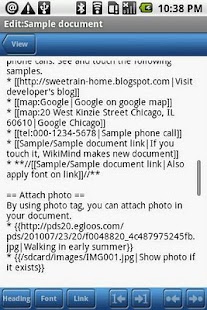
You can read your memo effectively with WikiMind.By using simple wiki syntax, you can express title, headlines, numbering, indentation, bold, italic, etc.
It really helps you to read your memo.And you can also use the link function to jump to web site, google maps, or other WikiMind document.
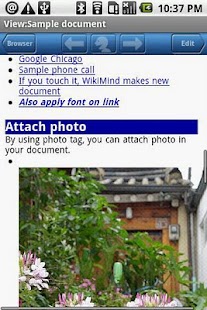
Attach your photo also available.
It also have many customize options.
You can configure this application for your conveniences.
Features:- Manage documents * Tab and hold on a file or folder in browser screen.
You can see the file management functions in the context menu * All documents are normal text file.
So you can manage or edit in your PC easily * Support external memory (Preferences -> General)- Support the Wiki syntax- Select the start document.
If you select the start document, WikiMind shows it whenever you execute * Select the start document in Preferences -> General- Link to other WikiMind document, Phone dial, Google Maps, or web pages * In the editor screen, use wiki tag or 'Link -> Other documents' in the bottom edit toolbar- Attach photo from web or in your device * In the editor screen, use wiki tag or 'Link -> Attach Image' in the bottom edit toolbar- Attach photo from camera directly (Only in full version) * In the editor screen, use wiki tag or 'Link -> Attach Image -> Use camera' in the bottom edit tool bar * WikiMind launches the camera and attach it directly in the document- Insert frequently using words easily with macros * Configure the macro in the 'Preferences -> Macros' * In the edit screen, press the 'Menu' button and select 'Edit' menu.
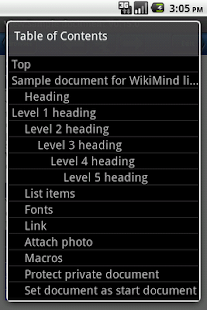
You can find the date/time macro and user defined macros * You can configure your macro with some reserved word to insert date/time easily- Edit/Navigation toolbars, and flexible configurations * Apply the wiki tags easily with edit toolbar * move between the linked documents with top navigation toolbar (like web browser)- Encrypt document- Encrypt folder (Only in full version) * Encrypt documents in the selected folder * New document created in the encrypted folder also encrypted * Configure security level for access the encrypted folder (Preferences -> General)- Generate table of contents * Select 'Menu -> Table of contents' in the view/edit screen * Generate table of contents automatically with headings- Configure the power management.
It doesn't screen off when you didn't enter anything * Configure it in 'Preferences -> General'- Full text search- Link to external files
If you have any question or requirements, please visit my blog or send me a mail.
About WikiMind note
- Package name (App ID)
- com.sweetrain.wikimind.pro
- Available on
- Google Play
- Price
- Free
- Version
- v1.3.7
- Developer
- bunker
Looking for the WikiMind note APK?
The safest way to get WikiMind note (com.sweetrain.wikimind.pro) on your Android device is to install it directly from Google Play — you'll always get the latest official version, automatic updates, and no risk of modified or infected APK files from third-party sites.
Camera Features
Advanced camera features with editing capabilities.
Food & Dining
Discover recipes and order food from your favorite restaurants.
News & Updates
Stay informed with the latest news and updates.
See WikiMind note in Action
Frequently Asked Questions
Is WikiMind note free?
Yes, WikiMind note is free to download and install on Android through Google Play.
How do I install WikiMind note on Android?
Open Google Play on your Android phone or tablet, search for WikiMind note by bunker or tap the Google Play button on this page, then tap Install. The app downloads and installs automatically.
What is com.sweetrain.wikimind.pro?
com.sweetrain.wikimind.pro is the App ID (package name) of WikiMind note on Google Play. Every Android app has a unique package name, and it is the safest way to verify you are installing the official app.
Is WikiMind note safe to download?
Installing WikiMind note from Google Play is the safest option: you get the official version published by bunker, verified by Google Play Protect, with automatic updates. Avoid APK files from unofficial third-party sites.

Get WikiMind note Today
WikiMind note for Android — free download on Google Play.
Compatible with Android phones and tablets — available on Google Play.
Ask AI about this app
Get instant answers about features, tips and more from popular AI assistants.